
Setting up Authorized Users
A student can create an authorized user to allow a parent or other individual to make payments on their student account through the web portal. The authorized user will have very minimal access to information about the students account and should not be considered a substitute for a release of information.
Student Instructions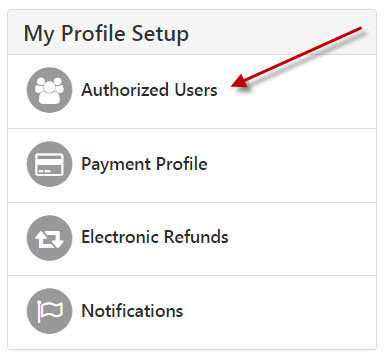
- Log in to your Bobcat Web Account and select "click here to setup an authorized user"
- You may be prompted to create a refund profile. You may create a profile or select "Remind Me Later"
- Select Authorized Users under My Profile Setup
- Enter the email address of the person you want to give access to. Please note that this ONLY gives authorization to make payments on your account and to view your payment history.
- Check “I Agree” and Click “Continue”
- The Authorized User will receive two emails. One with a Username, and one with a temporary password and a link to the Authorized User login page
Authorized User Instructions
1. Log in to TouchNet Portal using your username, temporary password, and the link that you received in your email.
2. The page will now ask you to set up your profile and change your password. You
are now set up as an Authorized User